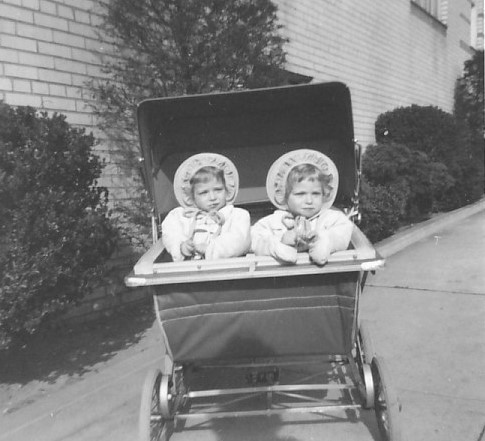
So excited to be celebrating another twin birthday! Happy birthday to my special Sis. And many more!
Here we are in our twin bonnets, out for an outing in the twin baby buggy. Lots of blonde hair sticking out of those bonnets.
This photo was taken alongside the Bronx apartment building where we grew up, one block from a big park. It felt like suburbia back in the day.
Adventures in #Genealogy . . . learning new methodology, finding out about ancestors, documenting #FamilyHistory, and connecting with cousins! Now on BlueSky as @climbingfamilytree.bsky.social
Pages
- Home
- Wm Tyler Bentley story
- Isaac & Henrietta Birk's story
- Abraham & Annie Berk's Story
- Farkas & Kunstler, Hungary
- Mary A. Demarest's story
- Rachel & Jonah Jacobs
- Robt & Mary Larimer's story
- Meyer & Tillie Mahler's story
- McClure, Donegal
- Wood family, Ohio
- McKibbin, Larimer, Work
- Schwartz family, Ungvar
- Steiner & Rinehart
- John & Mary Slatter's story
- MY GENEALOGY PRESENTATIONS
Friday, February 22, 2019
Wednesday, February 20, 2019
Family Photos: The Man Who Wasn't There
![]() |
| Excerpt from 1916 wedding photo of Alex Farkas and Jennie Katz in New York City |
Same goes for family photos. I have several group photos taken at family weddings. But sometimes a key ancestor is missing, as in the 1916 wedding photo shown above (with an excerpt of the caption page superimposed). This is my #52Ancestors story of the man who wasn't there.
Name that Farkas ancestor
If you squint, you can see someone long ago wrote numbers in white ink on people's hats or lapels. At one time, there was surely an identification key. But 103 years later, no one has it or remembers ever seeing it.
Interestingly, the bride and groom weren't numbered. So when I added the numbers (following the numbering system used on the original), I called the bride A and the groom B. The groom is my great uncle Alex Farkas, the bride is my great aunt Jennie Katz. I also recorded the occasion, date, and geographic location on this numbered photo for future generations to know.
One of my favorite cousins had already identified all the Farkas siblings in this photo. I typed up the list by number (see excerpt above, superimposed on photo). My Grandma Minnie Farkas Schwartz is #19 and Grandpa Teddy Schwartz is #20.
We had a question about one of the Farkas siblings, and another cousin chimed in to confirm who it was. The many blanks on the caption page are, we suspect, members of the bride's side and some friends, whose names and faces none of us know. No one is left on the bride's side to ask, and they had no children.
The man who wasn't there
Stepping back from the identifications, it was clear one Farkas sibling was not in the photo: Albert Farkas (1888-1956). Why was he not at his older brother's wedding?
I searched his time-line again and noticed that he was inducted into the US Army in August, 1918, to serve in WWI (see above). But that didn't explain his absence from a photo in December, 1916.
Clicking to search for more, I found a registration form (above) from the U.S. Consulate in Canada, indicating that Albert Farkas had registered as an American citizen living in Vancouver in November, 1912. He was still there in October, 1916, but this certificate was to expire within months.
Write it down or risk losing it
Asking around, I found one cousin who remembered the story: Albert left Vancouver in 1917 because, with Canada already at war, he was going to be called to serve in their military. So Albert came home to New York City and wound up drafted when America entered the war soon afterward.
I added this explanation to the bottom of my page of identifications because someday, when I join my ancestors, someone might notice Albert's absence from this family photo. If I don't write it down, it could be forgotten and fall into the category of one of those family history mysteries we all puzzle over.
It would be a shame to have the identifications lost for a second time. That's why I've sent my first and second cousins a three-page .pdf file of this photo with numbers, a page of captioned names, and an unnumbered version of the photo, asking them to share with their descendants. I want to keep the names and faces alive into the future.
Labels:
#familyhistory,
#Genealogy,
captioning,
family photos,
Farkas
Monday, February 18, 2019
Taking Care of 102 Year Old Photos
Yesterday was the day. I slit open the package of special archival acid-free buffered tissue paper I purchased at the end of last year, intended for interleaving within photo albums. This was on my genealogy to-do list for 2019, and now it is checked off!
Above, a photo of my late father-in-law's 1917 photo album, with the archival box in which I store it (note identifying label on the box).
This 1917 album is the oldest I've been entrusted with, as the genealogist of this generation. I've also been entrusted with my late father-in-law's 1926 Tufts College album.
It's up to me to safeguard these old photo albums so they survive for future descendants to enjoy. Each album has its own archival box, so it doesn't get jostled or damaged. But without interleaving between the pages, items on the pages might deteriorate or rub off on each other. That's why I needed to work on interleaving.
Along the way, I learned a couple of lessons about how to carefully place interleaving paper between pages of albums. Of course, begin by washing/drying hands and putting all materials on a clean, dry surface, far from liquids, foods, perfumes, etc. Then:
Above, a photo of my late father-in-law's 1917 photo album, with the archival box in which I store it (note identifying label on the box).
This 1917 album is the oldest I've been entrusted with, as the genealogist of this generation. I've also been entrusted with my late father-in-law's 1926 Tufts College album.
It's up to me to safeguard these old photo albums so they survive for future descendants to enjoy. Each album has its own archival box, so it doesn't get jostled or damaged. But without interleaving between the pages, items on the pages might deteriorate or rub off on each other. That's why I needed to work on interleaving.
Along the way, I learned a couple of lessons about how to carefully place interleaving paper between pages of albums. Of course, begin by washing/drying hands and putting all materials on a clean, dry surface, far from liquids, foods, perfumes, etc. Then:
- Start from the back of the album and work your way forward. That way, the paper doesn't slip out or shift as easily.
- Turn pages gently so they don't rip or flake as you slip in the archival paper.
- If pages have multiple overlapping items glued down, place a small piece of interleaving paper between these so they don't rub off on each other or discolor each other. Then place one piece of paper over all.
- Don't overstuff between album pages!
- If archival papers hang off too much, carefully cut off the edges (leaving a small margin all around the album) at the end of the project. I used the extra paper cut off to "stuff" next to one album so it doesn't rattle in the box.
Backlink to #Genealogy Blog Party: https://fresh.inlinkz.com/party/17204e79bd4a4994b4ee124260bea876
Friday, February 15, 2019
Who Can See Your Family History Media?
![]() |
| Facts on Great-Grandma Tillie Jacobs Mahler's family tree, with attached media |
This way, the digital media will be in my genealogy file folders (arranged by surname and/or family) and in my genealogy software.
Just as important, I'm making sure these media images (Census, vital records, and more) will be visible to anyone who finds my public family trees. I welcome cousins browsing my trees and would love to imagine them clicking to see the media image for themselves. In reality, this is a long shot, but at least the media are visible because the trees are public.
Download, then upload family history media
After I download an image related to a source (such as a Census page), I rename it and save it in the proper digital folder. I also add it to my genealogy software.
The next step is to upload that source as an image to support the related fact on my online tree. You can see what that looks like on my paternal great-grandma's Ancestry tree, shown above in excerpted form. You can see a thumbnail preview of the uploaded media next to the related facts.
Census pages are unlikely to be totally withdrawn from public view, IMHO, because they are so widely available. Especially when the transcription or indexing is squirrelly, I will occasionally attach a blowup of the relevant section as the media rather than the entire page to support a fact. I did this for the 1900 US Census and 1905 NY Census in my tree, above.
Media for possible cousins and future genealogists
OK, I'm late to this party. I was delighted at the distant cousin who not only attached actual Census pages and other media but summarized the contents in the comments area--especially full street addresses or other details. I know he's a careful researcher and I can see at a glance where he says our common ancestors lived or died. Thank you!
When researching common surnames like WOOD, having the ability to quickly check an original source is a big plus. I like to think I'm helping my husband's cousins and future genealogists by attaching the media and not relying solely on links to source citations.
I'm approaching this as a long series of bite-sized projects. One ancestor at a time, I'm capturing, downloading, uploading, and attaching source media. One at a time, not all at once. No tree ever grew in a day.
Wednesday, February 13, 2019
Why I Use Genealogy Software (It's Not Why You Think)
RootsMagic is my genealogy software of choice for one big reason: It syncs with Ancestry, my research/tree site of choice.
But unlike most researchers, I don't do my work in the software and then upload to Ancestry.
On the contrary, I prefer to work in Ancestry (including research and uploading photos/documents) and then download to my computer, via my sync with RootsMagic.
My Technology May Not Be Their Technology
Why? My mind is constantly thinking way ahead to what happens when I someday join my ancestors.
On that faraway day, even though my Mac computer will remain on my desk, it may as well be a pile of bricks as far as my genealogy heir(s) are concerned.
I'll bet none of the next generation will be bothered to open my genealogy software, let alone learn how it works. They'll have their own technology preferences, and any specialized genealogy software on my desktop Mac is unlikely to appeal to the mobile-first younger generation. Just ask your younger relatives and see if they agree.
With this in mind, I don't think of my genealogy software as the primary place to keep my tree and media. In a sense, my computer-based software acts like a backup to my Ancestry tree.
A Family Tree Grows Online
I believe descendants and relatives (and cousins I don't yet know about) are far more likely to find my public family tree on Ancestry, if they have any interest at all.
As I wrote in my book, Planning a Future for Your Family's Past, online trees should be noted in any genealogical "will." For my part, I'm leaving my genealogical heirs a bit of money for an Ancestry subscription so they can noodle around and see how the tree works. They can use mobile or desktop devices, whatever suits their fancy.
Of course, I sync with RootsMagic very frequently so I always have the latest version of my tree on my computer, including all media. This is because I work on the Ancestry tree (multiple trees, actually) every week, sometimes every day. New documents become available, or new photos surface in the family--those are good reasons to add to my online tree and share with those who have been invited to see it. Also, I like to look at DNA hints and compare those trees with mine on Ancestry. It's just convenient to have the latest tree online.
Way in the future, my heirs can decide if they want their own genealogy software. If not, they and I can rest easy, knowing the tree and documentation are on Ancestry for the family to see at any time.
But unlike most researchers, I don't do my work in the software and then upload to Ancestry.
On the contrary, I prefer to work in Ancestry (including research and uploading photos/documents) and then download to my computer, via my sync with RootsMagic.
My Technology May Not Be Their Technology
Why? My mind is constantly thinking way ahead to what happens when I someday join my ancestors.
On that faraway day, even though my Mac computer will remain on my desk, it may as well be a pile of bricks as far as my genealogy heir(s) are concerned.
I'll bet none of the next generation will be bothered to open my genealogy software, let alone learn how it works. They'll have their own technology preferences, and any specialized genealogy software on my desktop Mac is unlikely to appeal to the mobile-first younger generation. Just ask your younger relatives and see if they agree.
With this in mind, I don't think of my genealogy software as the primary place to keep my tree and media. In a sense, my computer-based software acts like a backup to my Ancestry tree.
A Family Tree Grows Online
I believe descendants and relatives (and cousins I don't yet know about) are far more likely to find my public family tree on Ancestry, if they have any interest at all.
As I wrote in my book, Planning a Future for Your Family's Past, online trees should be noted in any genealogical "will." For my part, I'm leaving my genealogical heirs a bit of money for an Ancestry subscription so they can noodle around and see how the tree works. They can use mobile or desktop devices, whatever suits their fancy.
Of course, I sync with RootsMagic very frequently so I always have the latest version of my tree on my computer, including all media. This is because I work on the Ancestry tree (multiple trees, actually) every week, sometimes every day. New documents become available, or new photos surface in the family--those are good reasons to add to my online tree and share with those who have been invited to see it. Also, I like to look at DNA hints and compare those trees with mine on Ancestry. It's just convenient to have the latest tree online.
Way in the future, my heirs can decide if they want their own genealogy software. If not, they and I can rest easy, knowing the tree and documentation are on Ancestry for the family to see at any time.
Subscribe to:
Comments (Atom)