Sunday, March 20, 2022

Honoring the Memory of Ancestors Killed in the Holocaust


Rezi Regina Schwartz Winkler was the oldest sister of my grandpa Theodore Schwartz. Sorry to say, Rezi and too many other family members were killed in the Holocaust. As I learn more, I've been adding their names to my online family trees, to honor their memory and not let them be forgotten in the future. 

Also I'm specifically identifying the cause of death for these ancestors where they appear on my family trees. 

  • MyHeritage adds an automatic designation of the yellow star when the user selects "Holocaust" as the cause of death from the drop-down menu. This is a visual indication of the fate of that ancestor.
  • WikiTree has different Holocaust stickers that can be posted on an ancestor's profile. I can separately identify an ancestor who died, an ancestor who survived, and so on, depending on each person's circumstances.
  • Ancestry allows me to add a custom TreeTag to ancestors. I created one to indicate any ancestor who was a Holocaust victim. If I choose, I can create a custom TreeTag for Holocaust survivors.
  • On FamilySearch, I created a custom fact for the "other information" field to indicate an ancestor who died in the Holocaust.

Prior to World War II, most of my grandfather's family lived in and around Ungvar, which is now Uzhhorod, Ukraine. One way I'm supporting relief efforts in Ukraine is by attending the all-virtual Jewish Roots in Ukraine workshop on April 3d. The four experts will be talking about research strategies, sources of information, and understanding Ukrainian ancestors in context. I'm registered and ready to learn as well as to aid Ukraine.

Friday, March 18, 2022

Save March 26-27 for History for Ukraine


Want to support Ukraine relief efforts AND learn from well-known history and genealogy experts?

Get ready for History for Ukraine, the star-studded live marathon of talks assembled by Nathalie Pithers and a team of volunteers, taking place March 26-27!

Here are some of the speakers already confirmed to participate: 

  • Josh Taylor, President of the New York Genealogy and Biography Society
  • Judy Russell, "The Legal Genealogist"
  • Amy Johnson Crow, Host of Generations Cafe podcast and #52Ancestors originator
  • Earl Charles Spencer, best-selling history author and founder of Althorp Literary Festival
  • Dr Janina Ramirez, BBC documentary maker, author, and President of the Gloucester History Festival
  • Dr Wanda Wyporska, head of the Society of Genealogists
More speakers will be announced shortly. A few days ago, Family Tree Magazine conducted an interview with Nathalie Pithers. In her words, "History for Ukraine is a combination of Live Aid and Red Nose Day, but for history!"

Although this special event is entirely free, donations will be gratefully accepted! (In fact, donations can be made in advance if you wish.)

All proceeds go to DEC Ukrainian Humanitarian Appeal which is administered by the British Red Cross.

Please mark your calendars! See you at History for Ukraine on March 26-27.

Wednesday, March 16, 2022

New, Free New York City Vital Records!

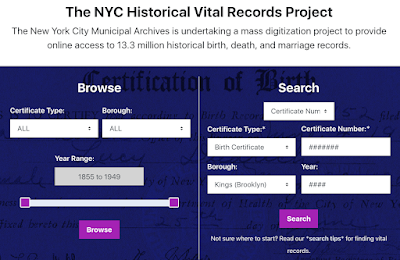
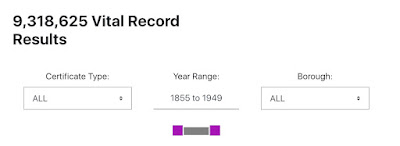
Anyone with ancestors who were born, married, or died in New York City from 1855 through 1949 can now search the New York City Municipal Archives site and view more than 9 million document images, at no charge. This action wasn't directly due to any specific lawsuit by the nonprofit Reclaim the Records, although it has sued the agency four times to get public images made public. This particular release of documents is a project that New York City has been working on for years, and now the results are being made available for free

As shown in the image above, note that these images are for vital records only from 1855 through 1949. Also, not all images have yet been scanned, but the majority are available to be found via search or browsing.

Search by cert number

NYC recommends searching by certificate number, borough, and year for the best results. You can find a cert number in a number of ways. There are indexes on Ancestry, Family Search, and other sites, but usually I use the databases at ItalianGen.org - also free, thanks to the efforts of many incredible volunteers. 

As shown above, you can search the ItalianGen databases for birth, marriage, death by surname and given name or initial, specify a range of years, and narrow the search to a specific New York City borough. When I did this for my great aunt Sadie Mahler's marriage, I found two possibilities. I know her spouse (Samuel Smith) but if I didn't, the ability to look at either of these certs FOR FREE is a big, big plus.

Once I plugged in the cert number, borough, and year using the NYC search function, up popped Sadie and Sam's marriage document, both page 1 and page 2 (with their signatures and the witnesses). I don't need a certified copy for my genealogy, but if you do, you can click to buy.

Want to browse?


If you want to browse in search of an ancestor's cert (maybe you can't find the cert number, for instance), you can use the browse interface here. Select type of certificate, borough, and don't forget to use the slider to narrow the range of years.

What a wonderful treat to have, just two weeks before the 1950 US Census is released!

PS: I tried finding Sadie's marriage cert at FamilySearch but "no image" was available, only a transcription. Much better to have the actual image to view!

Saturday, March 12, 2022

1950 US Census Prep: Finding Small Town EDs

The 1950 US Census is almost here! Only 20 more days until this mid-century Census is released to the public by the US National Archives.

Even though there will be a basic index and the ability to search by name and location, nobody expects the initial index to be perfect or complete. Just in case, I've been using 1950ish addresses to locate the Enumeration District for my ancestors so I can browse the ED pages when they're made public. Or, at the very least, be able to search by name and ED, to be more specific about my searches. 

Most of my ancestors were in big cities in 1950. I described how to turn a big-city street address into an ED in an earlier post, using the incredibly powerful (and free!) Unified Census ED Finder on SteveMorse.org. 

Small town ED process

However, there's a slightly different process for finding the EDs of towns with fewer than 5,000 residents, because Steve Morse has no tables for towns that small. (He explains why on this FAQ page.)

Here's the process for finding a small town ED.

As shown in the screen grab at top, I'm using the example of the small town of Woodbury, Connecticut, which had 2,564 residents in 1950

First, I went to the Unified Census ED Finder page, and used the drop-down menus to specify the state of Connecticut and the county of Litchfield, where Woodbury is located.

Although some larger population centers are available in the drop-down menu for town/city, Woodbury is not. So instead, I selected "other" in that drop-down menu area and typed the town name (purple arrow).

ED map or description or both?

There are five possible EDs in this general area, listed in numerical order in the image at top. I don't want to browse all five in search of a Woodbury resident.


To narrow down my options, I checked the ED descriptions (in image at top, see green arrow). 

This took me to a page with written descriptions of the five possible EDs for Woodbury, as shown directly above. However, I don't know Woodbury well enough to determine from these descriptions which ED would be the most likely for my purposes. Anyone who knows the streets might take a solid guess from these descriptions.


Then I clicked to see the ED maps for the entire county (orange arrow). This took me to the list of map links shown above. The first five of the jpegs are what I wanted to view. These were sections of the entire county map, and I wanted to navigate around each map section to look for Woodbury. 


Most of the town is in one ED 

Of course, the fifth map I checked was the one where most of Woodbury is located. As shown directly above, the town is marked on the map and the ED number for the vast majority of that area is noted as 3-121

Combining the maps with the descriptions narrows things down considerably, even allowing for edges of the town that stick out beyond these straight lines.

Thursday, March 10, 2022

Lifespans at a Glance in New MyHeritage Feature


New feature alert!

At RootsTech, MyHeritage announced a number of new features. Today I tried the Family Tree Timeline.

Above, one example of how the timeline allows a graphical view of ancestors' lifespans. I can select any starting ancestor (here, my late mother-in-law, Marian Jane McClure Wood), and see as many as 9 generations back (here, I selected only 3 generations back). The color-coding tells me at a glance which ancestors belong to each branch, a practical visual reminder. 

I particularly like the age of death shown at right of each bar on the graph. When a death date isn't known, the bar fades in color and no "age at death" number appears. I can also turn on and off more complete info to be shown on each bar of the graph (such as birth/death years). I can use the length of each bar and the number at the end to analyze patterns (such as short or long lifespans in a particular branch).

This feature allows me to display or not, as I choose, major historical events (such as World War II), for context. Another useful element is a consistency checker, in which a dot next to a parent/child relationship alerts me to double-check dates (did I list a child's birth date that's after the mother's death, for instance?). 

Hovering over an ancestor's name on the timeline leads me to additional options, such as opening the profile to edit it or researching that ancestor. If I wish, I can download and/or share any timeline with a click. 

In short, I find this an easy and helpful way to visualize lifespans at a glance and put them into both family and historical context.